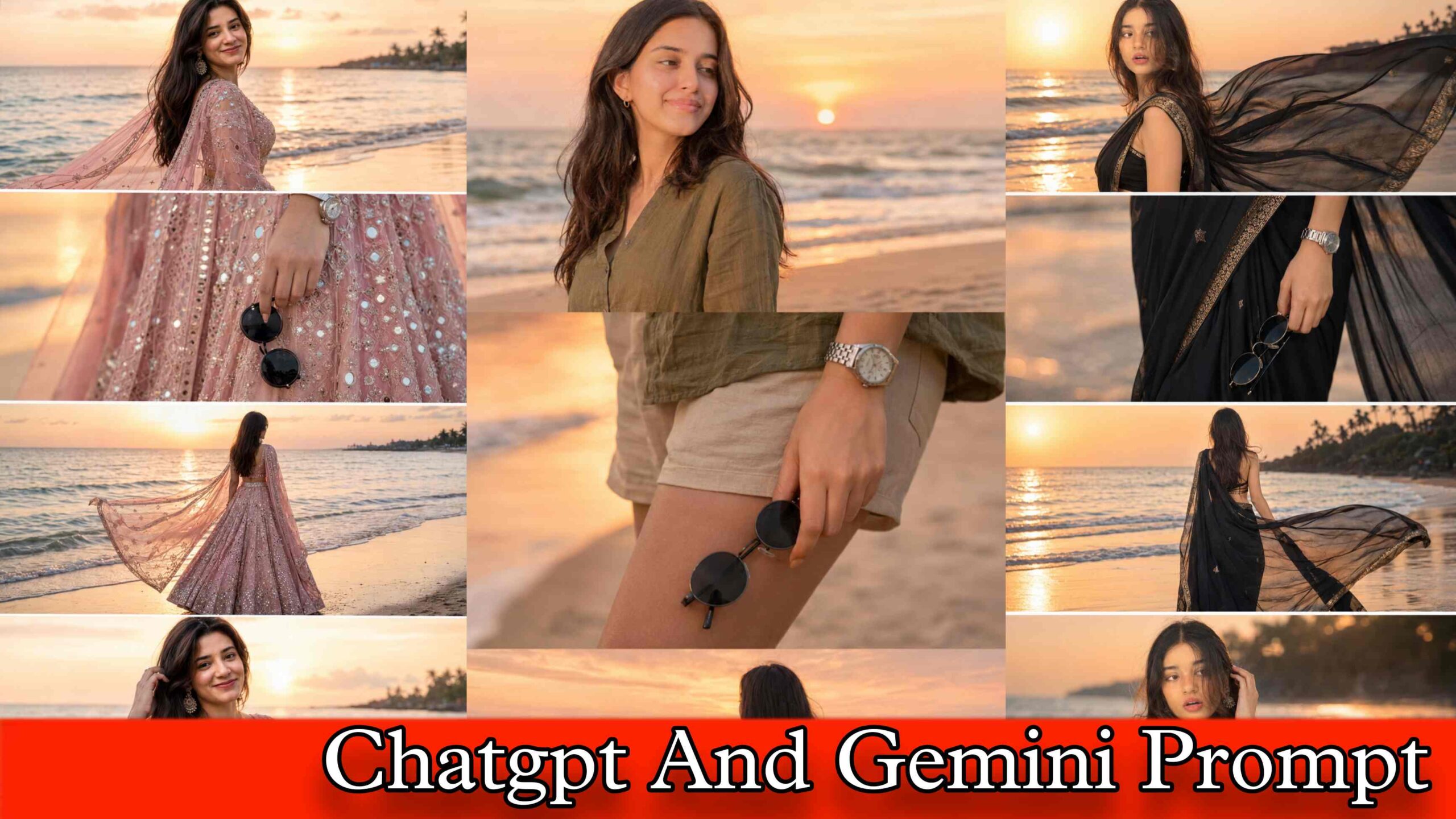
Beach Sunset Collage Ai Prompt – Friends, whether you or someone goes on a vacation trip or visits a beach with their friends or family, you must have definitely noticed one thing. While returning from a beach trip, the first thing they do is open their phone gallery and look at all the sunset photos they clicked.
People take all types of photos on the beach, some with the golden sky in the background, some with waves near their feet, and some just of the horizon where the sun is about to go down. And maybe you already know.
At present, one trend that is becoming extremely viral on Instagram and Pinterest is Beach Sunset Collage AI Photo Editing. People are combining multiple beach photos into one single beautiful collage using correct AI prompts.
Many people are also searching for it by the name of Beach Sunset Collage Ai Prompt or Realistic Sunset Collage AI Editing because in this type of photo, the entire collage looks so cinematic and warm-toned that it feels like it came straight out of a travel magazine.
You won’t believe that right now this trend is loved by everyone who travels or goes on beach trips. Both boys and girls are equally into it, that’s why today’s full article is about this topic only.
Detail Of Beach Sunset Collage AI Photo Editing
Use the prompts that I will provide you in this article to create this kind of beach sunset collage photo. Whether you use it to create photos in ChatGPT or Gemini, in any of them- an extremely realistic collage photo will be created that will look so real that no one will be able to tell.
In this type of collage, you will see a combination of two to four beach photos arranged in an aesthetic layout. The sky in the photos will have a warm orange, golden, and pink gradient, which is typical of a sunset at the beach.
Some photos in the collage show the beach from above just like a drone shot, while others show the horizon up close. Waves, sand, silhouettes of people, reflections of the sunset on wet sand, all of these elements are combined together, making it look like one perfectly composed travel photo.
Whatever beach selfies or sunset photos you upload to ChatGPT or Gemini, the AI will use those reference images and create the collage. The pose style, the clothes, the location feel… everything stays as close to your original photo as possible. In the created collage, we need the colour grading to look warm and cinematic, and the overall layout should look like an aesthetic travel diary page.
Single Photo Beach Sunset Collage Editing Prompt
Talking about beach sunset collage AI editing, a simpler version of this trend also became popular a few weeks ago. Many people only had one or two good beach photos, and they still wanted to create a collage-type aesthetic edit. So they started using AI to expand their single photo into a multi-panel collage layout.
The AI adds extra beach elements around the original photo, fills the sides with matching sunset sky, adds a soft but warm vignette, and makes the entire thing look like a proper collage even though it started from just one photo. The trend of this photo editing also became so viral that everyone who had even one decent beach photo was sharing it on Instagram reels and stories.
They were not creating new photos. They were simply taking their existing single beach photos and converting them into a cinematic collage aesthetic using AI prompts. If you also want to follow this trend, you will need a proper prompt because without a correct prompt the AI will not understand what layout and colour mood you want. If you want a separate prompt for this, comment in this article.
ChatGPT AI Prompt
Beach Sunset Collage AI Prompt
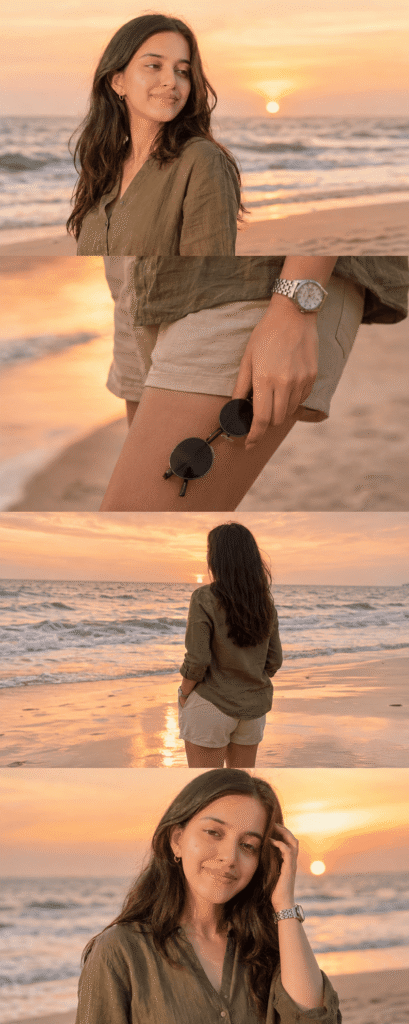
Ultra-realistic DSLR cinematic beach photoshoot collage featuring the SAME girl from the uploaded reference image. Preserve face identity 100% exactly — same facial structure, hairstyle, jawline, skin texture, expression style, body proportions, and natural appearance. Do NOT modify, beautify, age-change, slim, or stylize the face. Maintain the original realistic Indian female look with authentic features and exact face resemblance.

Create an Instagram portrait size 4-photo vertical collage (1080x1350) exactly like a trendy cinematic reel cover. Keep the SAME collage layout and framing style as the reference image.

Scene: golden sunset beach with pastel orange-pink sky, soft ocean waves, wet reflective sand, dreamy tropical atmosphere, warm cinematic sunlight, shallow depth of field, realistic DSLR photography, highly detailed skin texture, soft natural color grading.

Outfit: elegant olive green linen shirt with rolled sleeves, beige shorts, silver wristwatch, holding black round sunglasses. Natural beach fashion styling, realistic fabric texture, subtle wind movement.

Photo 1: medium side-profile portrait looking towards the horizon, calm and confident expression, ocean waves behind, cinematic sunset glow.

Photo 2: close-up shot of hand holding black round sunglasses near shorts pocket, shallow depth of field, cinematic focus blur background, detailed accessories.

Photo 3: back pose standing near shoreline facing the ocean during sunset, relaxed posture, soft breeze moving hair naturally, reflective wet sand.

Photo 4: candid portrait touching hair while smiling slightly, warm golden sunlight illuminating face, dreamy beach atmosphere, authentic expression.

Composition: exact same vertical stacked collage layout with thin borders between photos, aesthetic Instagram reel-cover style, balanced spacing, smooth warm tones, realistic shadows and lighting, professional travel-photography composition.

Camera settings: DSLR quality, 85mm lens, f/1.8 aperture, ultra-realistic HDR photography, natural skin texture, cinematic travel photography style, 4K details, shallow depth of field, realistic bokeh, magazine-quality portrait.

Color grading: warm golden-hour tones, soft orange-pink highlights, cinematic contrast, natural skin colors, luxury travel aesthetic, realistic sunset reflections.

Negative prompt: blurry face, extra fingers, distorted body, cartoon look, over-editing, unrealistic skin, AI face changes, beauty filters, low quality, duplicate person, bad anatomy, overexposed lighting, watermark, text, unrealistic proportions, plastic skin, excessive makeup, altered facial features.
Gemini AI Prompt
Realistic Sunset Collage Prompt
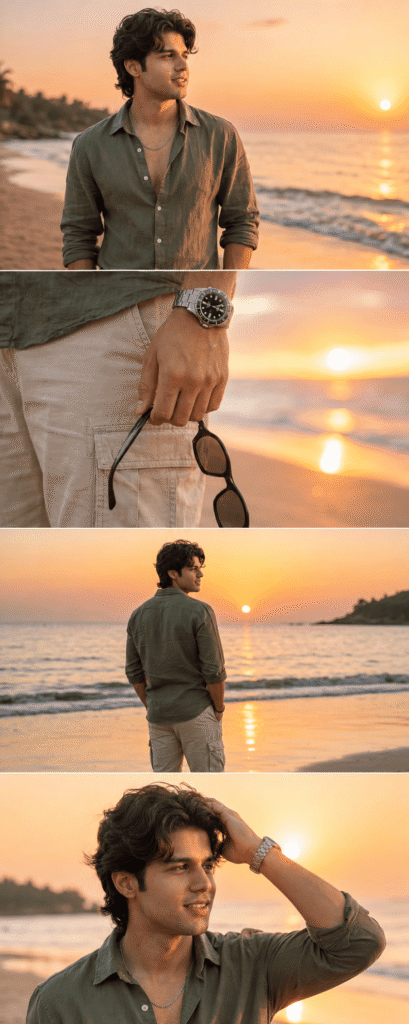
Ultra-realistic DSLR cinematic beach photoshoot collage featuring the SAME person from the uploaded reference image. Preserve the face identity with 100% accuracy — exact facial structure, hairstyle, beard density, jawline, skin tone, eye shape, body proportions, and natural expression. Keep the authentic realistic Indian male appearance. Do NOT beautify, reshape, smooth skin excessively, or alter facial features.

Generate an Instagram portrait size vertical 4-photo collage (1080x1350) in a luxury cinematic reel-cover aesthetic. Maintain the exact trendy stacked collage composition with clean horizontal divisions between each frame.

Environment: tropical beach during golden sunset hour, pastel orange-pink sky, glowing horizon, soft ocean waves, wet reflective shoreline sand, dreamy cinematic atmosphere, warm sunlight reflections, subtle sea breeze movement, realistic travel photography mood.

Outfit styling: olive green linen shirt with rolled sleeves, beige cargo shorts, silver metal wrist watch, black round sunglasses in hand, slightly messy textured hair.

Photo 1:
Medium cinematic portrait standing near shoreline, side profile looking toward the sunset horizon, calm expression, ocean waves behind, soft warm sunlight on face.

Photo 2:
Close-up aesthetic shot of hand holding black sunglasses beside shorts pocket, visible silver watch, shallow depth of field, smooth bokeh beach background.

Photo 3:
Back-view pose standing near ocean water facing the sunset, relaxed posture, cinematic framing, golden light reflecting on wet sand.

Photo 4:
Natural candid pose touching hair while smiling softly, warm sunset glow on skin, wind-blown hair effect, dreamy cinematic mood.

Photography Style:
Ultra-realistic DSLR photography, 85mm lens, f/1.8 aperture, shallow depth of field, HDR lighting, cinematic color grading, realistic skin pores, soft highlights, natural shadows, travel influencer aesthetic, luxury Instagram vibe, 4K ultra detailed.

Composition:
Exact same vertical stacked collage layout, evenly spaced photo strips, clean minimal borders, smooth warm tones, balanced cinematic framing, realistic lighting and shadows, premium Instagram reel-cover appearance.

Negative Prompt:
cartoon, painting, CGI, overedited face, smooth plastic skin, blurry details, distorted anatomy, extra fingers, duplicate body parts, unrealistic expressions, low quality, deformed hands, fake AI look, oversaturated colors, watermark, text, logo, cropped face, bad proportions.
Trending Beach Sunset Collage AI Photo Editing
Before creating a collage photo with the help of ChatGPT or Gemini or any other AI tool, try to make your reference beach photo as good as possible. Because AI prepares your entire collage based on the reference photo you upload. It does not depend completely on what type of prompt you are using.
If the reference photo is good and properly lit, even if there is some minor issue in the prompt, AI will still create a decent photo based on your reference image. That is why, before creating any kind of beach collage with AI, always make sure your original beach or sunset photos are bright, clear, and not too blurry. Ideally upload photos where the sky is visible clearly, and the lighting is natural.
Then select the AI tool you want to use to create the collage photo. Go to its app or website: for example, right now, I am going to tell you about creating beach sunset collage photos using ChatGPT. So you install the ChatGPT app from Google Play Store or App Store. Then open the app and login with the help of your Gmail ID or Apple ID.
After logging in, select the Create Image option and click on the Media or Attachment option. Now upload your reference beach or sunset photo from your gallery. Also, paste the prompt that we have shared in this article inside the chat box. When you enter what you want click the Send button. Wait a little while. The computer program will make a picture with parts for you.
It does not take long for the computer program to make your picture. It uses the picture you gave it. What you wrote to make a nice picture of a beach sunset. This picture will look like it was made by a professional. It will have parts and look warm and nice. If you do not like the picture the time you can try again. You can write something a little or use a different picture.
Final Thoughts
Lots of people are. Sharing nice pictures of beach sunsets online. More and more people are doing this every day. People who like to travel and go to the beach really, like making these pictures of beach sunsets. In today’s article on Aj Prompt, we have discussed in complete detail about how to make a beach sunset collage using AI prompts.
Not only this, we also talked about how people with even a single beach photo are using AI to turn it into a full cinematic collage layout. So whatever type of beach or sunset collage photo you want to create, just copy the prompt provided in this article and create your photo using ChatGPT or Gemini. If you have any question related to beach sunset collage AI photo editing then please ask us in the comment box below.