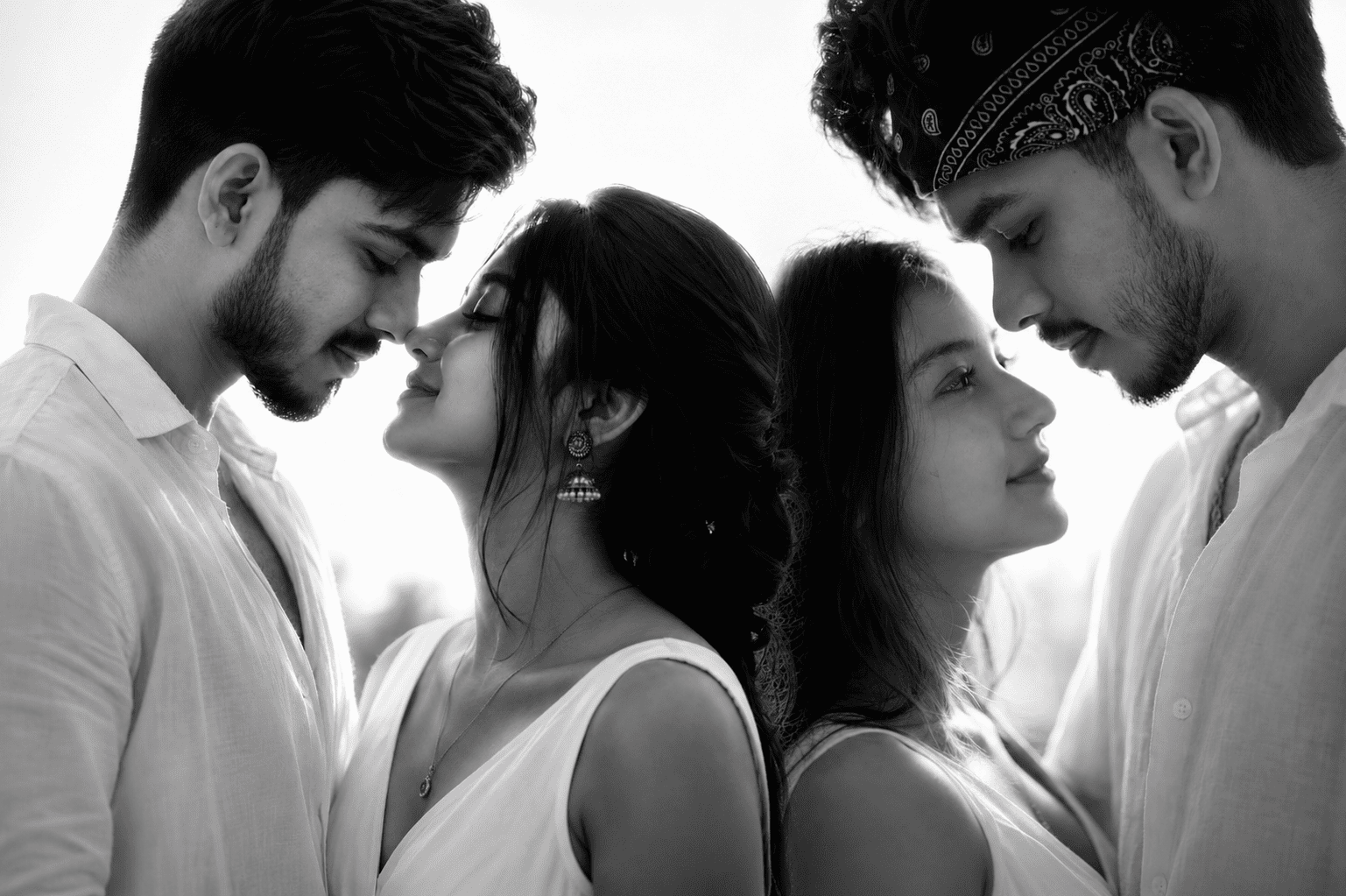
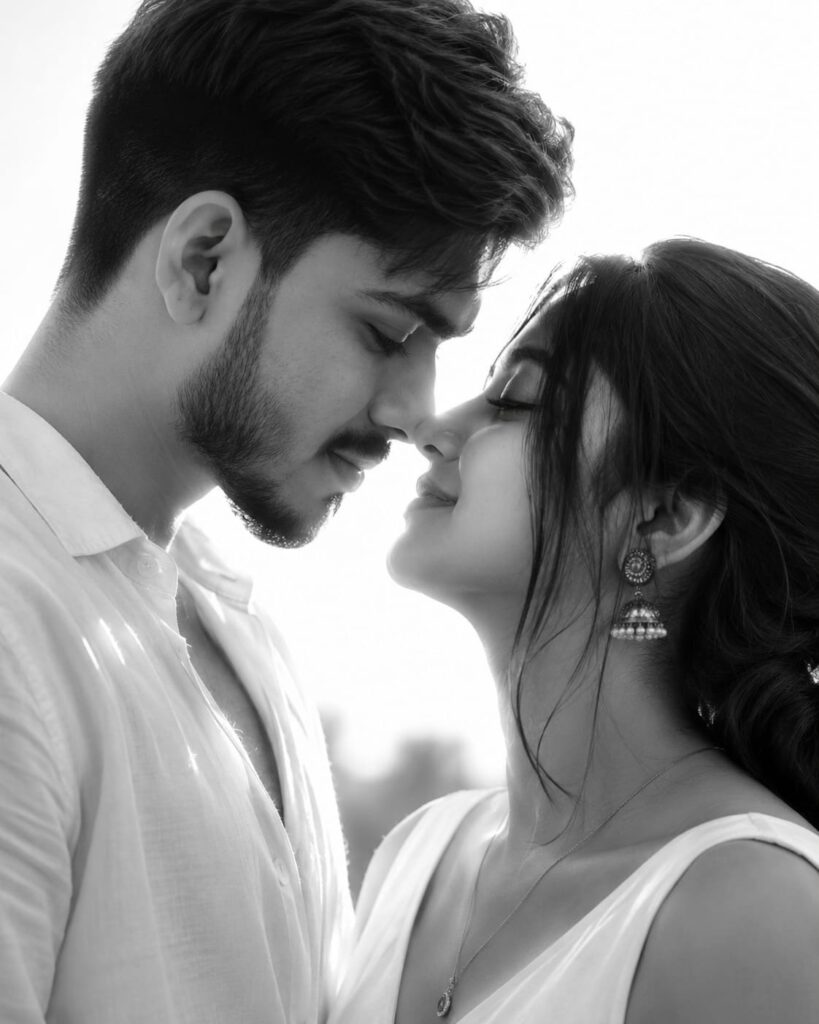
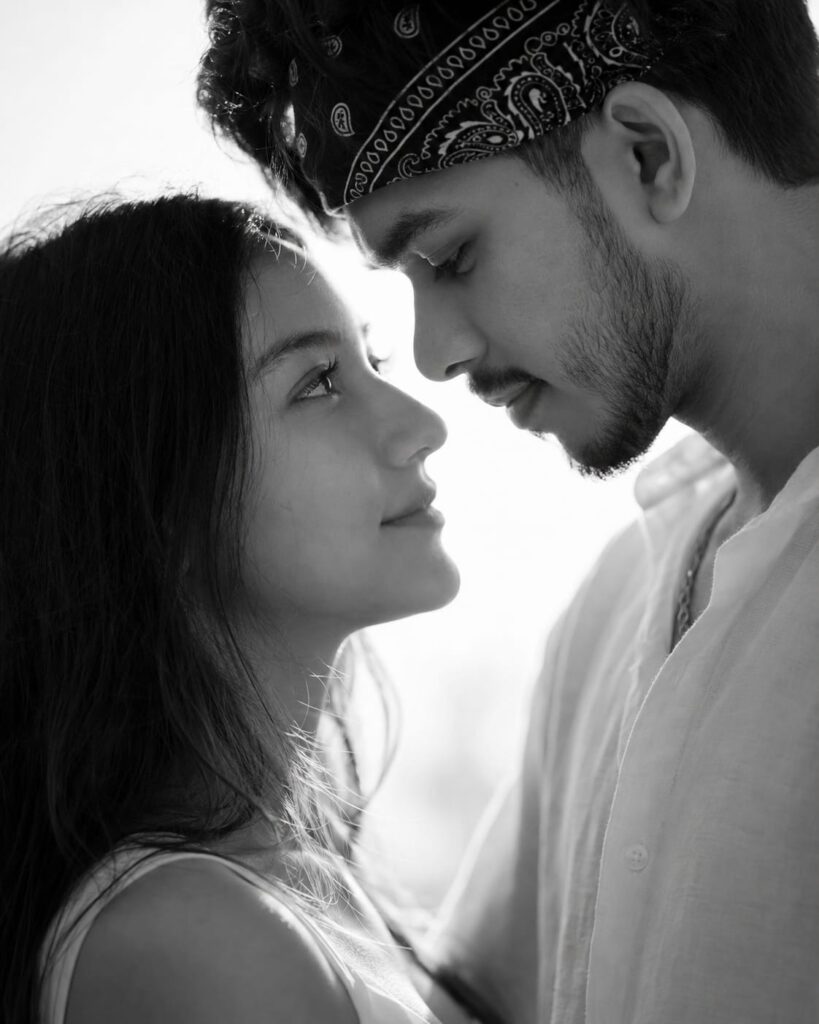
This Black & White Couple Portrait AI Prompt helps you create realistic romantic portraits with professional lighting, emotional expressions, and fine art photography aesthetics.
A great couple portrait is more than a photo. It captures emotion, connection, and a moment that feels unforgettable.
The problem is that many AI-generated couple portraits look fake. Facial features change. Expressions feel unnatural. Lighting looks flat. The final image loses the emotional connection that makes romantic photography special.
If you want a portrait that feels like it belongs in a fine art gallery, you need the right prompt structure. Small details make a huge difference.
Whether you are creating an AJ Prompt, chatgpt prompt, ai prompt, or gemini prompt, understanding these details can dramatically improve your results.
This guide breaks down exactly how to create an ultra-realistic black and white fine art portrait of a romantic couple in a way that looks authentic, emotional, and professionally photographed.
Why Most AI Couple Portraits Look Unrealistic
Many creators focus only on appearance.
They forget the elements that photographers use every day:
- Natural facial positioning
- Emotional expressions
- Professional lighting
- Lens compression
- Realistic skin texture
- Depth of field
- Proper body language
Without these details, even a beautiful portrait can feel artificial.
That’s why professional-level prompts need much more than basic descriptions.
A well-written ai prompt often performs better than a long prompt filled with unnecessary words.
The Perfect Fine Art Couple Portrait Setup
Facial Positioning
The most important element is connection.
For a romantic close-up portrait:
- Keep noses softly touching
- Position the couple in profile view
- Place them moments before a kiss
- Maintain original facial features
- Avoid changing face shape or identity
This creates genuine intimacy without making the scene feel forced.
Natural Body Language
Body language tells the story.
Use these positioning details:
- Man slightly taller
- Man gently leaning downward
- Woman tilting her head upward
- Relaxed shoulders
- Soft eye expressions
- Gentle smiles
Small adjustments create a stronger emotional impact.
These details work exceptionally well in an AJ Prompt designed for realistic portrait generation.
Why Black and White Works So Well
Color can sometimes distract from emotion.
Black and white photography focuses attention on:
- Facial expressions
- Light and shadow
- Skin texture
- Emotional connection
- Artistic composition
Fine art photographers have used monochrome portraits for decades because they create a timeless feeling.
The image feels elegant regardless of trends.
This is why many creators prefer a monochrome chatgpt prompt when aiming for emotional and cinematic portrait results.
Creating Cinematic Lighting
Lighting is where the magic happens.
High-Key Backlight
A bright backlight behind the couple creates:
- Glowing white background
- Soft silhouette effect
- Romantic atmosphere
- Professional studio look
This technique separates the subjects from the background beautifully.
Strong Contrast
For dramatic fine art results:
- Deep shadows
- Bright highlights
- Defined facial contours
- Sculpted nose profile
- Enhanced lip definition
Contrast adds depth and emotion instantly.
When building a gemini prompt for portrait photography, lighting instructions should always be specific and detailed.
The Importance of Realistic Details
Many AI images fail because skin looks plastic.
To avoid that problem, include:
Skin Texture
Request:
- Natural pores
- Realistic texture
- Fine facial details
- Authentic skin appearance
Hair Details
Ask for:
- Visible individual strands
- Soft flyaway hairs
- Natural texture
- Realistic edges
Lip Highlights
Subtle highlights create realism.
Avoid overly glossy lips.
A soft reflective touch looks more natural.
These details help any ai prompt produce images that feel closer to professional photography.
Choosing the Right Wardrobe
Simple outfits work best.
For the Woman
A white sleeveless dress creates:
- Clean visual lines
- Elegant appearance
- Strong contrast against shadows
For the Man
A white loose linen shirt with the top button open adds:
- Relaxed sophistication
- Timeless style
- Natural movement
Simple clothing keeps attention on the couple.
Lens Settings That Create Professional Results
Many people ignore camera settings inside prompts.
That’s a mistake.
Use an 85mm Lens Look
Professional portrait photographers love 85mm lenses because they:
- Compress facial features naturally
- Create flattering proportions
- Add a premium portrait feel
Use f/1.8 Aperture
A shallow depth of field creates:
- Soft background blur
- Subject separation
- Cinematic quality
- Fine art aesthetics
Together, these settings dramatically improve realism.
Whether you’re writing a chatgpt prompt or gemini prompt, lens information can significantly improve image quality.
Ideal Composition
Composition determines how emotional the portrait feels.
Use:
- Tight crop
- Centered faces
- Minimal background
- Extreme close-up framing
This removes distractions and focuses completely on the connection between the couple.
My Personal Testing Fix
After generating hundreds of AI portrait images, I noticed one pattern.
Most creators use phrases like “romantic couple portrait” and stop there.
The results often look generic.
My favorite trick is adding emotional micro-details.
Instead of saying:
“Couple smiling.”
Use:
“Calm affectionate expressions with soft smiles and relaxed eyes.”
This tiny change produces much more realistic emotions.
Another useful trick is specifically requesting:
“Keep original facial features unchanged.”
This helps preserve identity and prevents unwanted face modifications.
I have tested this approach across multiple platforms using an AJ Prompt, chatgpt prompt, and gemini prompt. The improvement in realism was noticeable almost every time.
Complete Professional Prompt
Ultra-realistic black & white fine art portrait of a romantic couple in extreme close-up profile, noses softly touching, about to kiss. Keep original facial features unchanged. Man slightly taller, gently leaning down; woman tilting her head up. Both with calm, affectionate expressions and soft smiles. High-key backlight from behind creates a glowing white background with soft silhouette effect and subtle edge facial details. Dramatic cinematic lighting with strong contrast, deep shadows, and bright highlights shaping lips, nose, and contours. Outfit: woman in white sleeveless dress, man in white loose linen shirt with top button open. Include natural skin texture, soft lip highlights, visible hair strands, and subtle jewelry details. Style: monochrome, high contrast, soft rim lighting, shallow depth of field. Lens feel: 85mm, f/1.8. Composition: tight crop, centered faces, minimal background. Mood: intimate, emotional, timeless. Aspect ratio: 4:5.
This prompt can be used as an ai prompt, chatgpt prompt, AJ Prompt, or gemini prompt depending on your preferred image generation platform.
Final Thoughts
Creating an emotional black and white couple portrait isn’t about adding more effects.
It’s about using the right details.
Focus on authentic expressions, professional lighting, realistic skin texture, and natural body language. When these elements work together, the final image feels less like AI and more like a photograph captured by an experienced portrait artist.
The difference is subtle, but it changes everything.
A carefully crafted AJ Prompt or ai prompt can often outperform dozens of generic prompts because every detail serves a purpose.
Frequently Asked Questions
Q1. Why are black and white couple portraits so popular?
Black and white portraits remove color distractions and emphasize emotion, lighting, expressions, and artistic composition.
Q2. What lens creates the best romantic portrait effect?
An 85mm lens is considered one of the best portrait lenses because it produces flattering facial proportions and beautiful background blur.
Q3. How can I make AI-generated portraits look more realistic?
Use detailed prompts that include realistic skin texture, natural hair strands, cinematic lighting, authentic expressions, shallow depth of field, and preserved facial features. Adding these elements to an ai prompt, chatgpt prompt, or gemini prompt can greatly improve realism.